
Casino Lüks Mobile Access: APK, QR Code and Add to Home Screen
Casino Lüks has no official listing on the App Store or Google Play. Mobile access works through two separate methods instead: an Android APK downloaded via a QR code, and an iOS shortcut created through Safari's Add to Home Screen feature.
How do I install Casino Lüks on Android?
The install page shows a QR code. Scanning it with your phone's camera starts the APK download, and the file is roughly 43 MB. Setup runs through five steps:
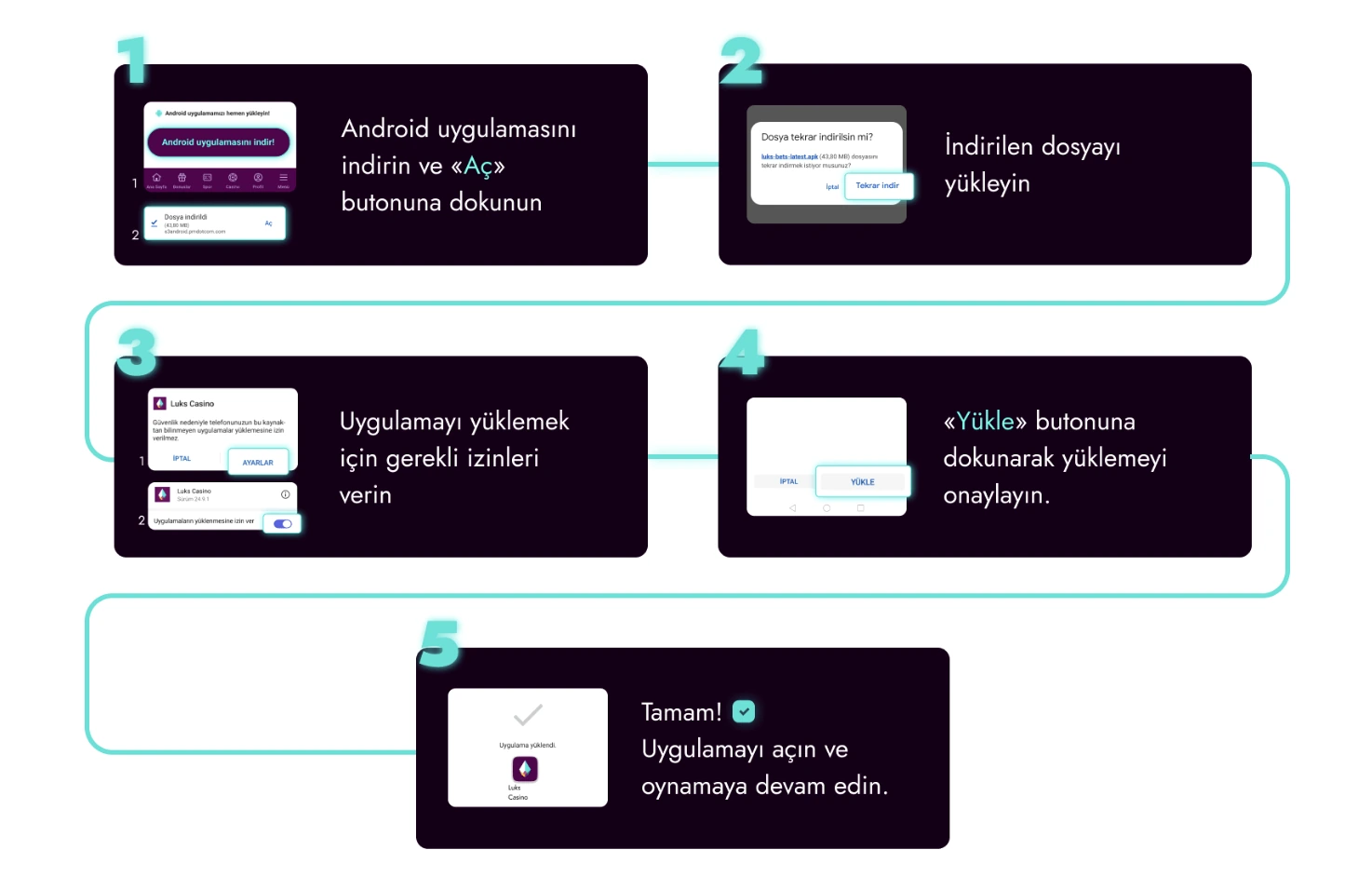
- Download the Android app and tap "Open".
- Download the file again if needed.
- Approve the installation permissions your device asks for.
- Tap "Install" to finish the setup.
- Open the app and continue playing on your account.
The permission in step three allows installs from unknown sources; without it turned on, the Install step will not complete.
How do I access Casino Lüks on iOS?
There is no separate App Store app for iOS. Instead, the site is added to the home screen as a Progressive Web App through Safari:
- With the site open in Safari, tap the "Share" icon at the bottom of the screen.
- Choose "Add to Home Screen" from the menu that opens.
- Tap "Add" to confirm.
- The Casino Lüks icon then appears on your home screen as a web shortcut.
The session you open from this shortcut uses the same account as the one you open from a browser, so no separate registration or login is needed.
Android vs. iOS: how the two access methods compare
The APK install and the Safari shortcut differ in step count and in the permission each one needs. The table below lines up the two methods side by side.
| Feature | Android (APK) | iOS (Home Screen) |
|---|---|---|
| Store listing | Not on Google Play | Not on the App Store |
| Access method | APK file via QR code | Safari Share menu shortcut |
| Approximate file size | 43 MB | No separate file downloaded |
| Number of steps | 5 steps | 4 steps |
| Permission required | Allow installs from unknown sources | No special device permission |
| Account session | Log in with your existing account after install | Uses the same session as your browser |
Both methods run on the same account. Only one account is allowed per user, so installing the APK or adding the Safari shortcut never creates a new registration — you connect with your existing login details. If your connection drops mid-download, use the "download the file again" option in the install steps; the Safari shortcut skips this entirely since no separate file is downloaded.
What to check before you install
A few checks before you start the APK download or add the Safari shortcut can save you a retry.
- Your Android device needs roughly 43 MB of free storage for the APK file.
- The setting that allows installs from unknown sources must be turned on, or the "Install" button in step five won't work.
- On iOS, the site needs to be open in Safari specifically — the shortcut cannot be added from another browser.
- Since installing doesn't create a new account, keep your existing phone number, email address or Account ID on hand to log in afterward.
- If the QR code won't scan, open the install page directly from your mobile browser and reach the APK link from there.
Why isn't there an official App Store or Google Play listing?
The app is not published in either store; mobile access is offered only through the APK download and the PWA shortcut. Outside of these two methods, there is no other install channel for mobile devices. Without a store listing, updates don't arrive automatically: updating the APK means returning to the install page and downloading the file again, while the Safari shortcut always shows the current version of the site since it opens the live page each time.
How does the mobile web version work?
You can reach the platform without installing anything. The web version uses a responsive layout that adjusts to your screen size, so menus and game cards rearrange themselves when you open the site from a phone or tablet browser. This version works on both Android and iOS without any extra setup. From a mobile browser alone, without installing anything, you can complete the following:
- Open a new account by phone or email through the registration form.
- Log in to an existing account.
- Deposit through the bank/IBAN or crypto options on the deposits page.
- Play across the slot, live casino and sports betting categories.
- Follow daily missions and tournaments in the rewards hub.
All of these work the same way whether you're using the installed APK app, the Safari shortcut, or just a browser tab — the only difference is how you reach the site. The rewards hub isn't limited to daily missions either: a Daily Champion leaderboard race, the Şanslı Loto 55 draw and a VIP deposit cashback are also tracked from the same hub on mobile.
What does the mobile registration form ask for?
The registration form opens through a phone or email tab. Filling in the phone tab from a mobile device, you'll see the following fields.
- Country code (defaults to +90) and a phone number in the +90(XXX) XXX-XXXX format.
- A password of at least 6 characters, with a show/hide toggle.
- Welcome package selection: Casino Package, Sports Package, or registering without a package.
- An optional promo code field.
- A checkbox confirming you're 18+ and accept the Offer Agreement.
The "Register" button stays inactive until the required fields are filled in — the mobile form applies the same validation rules as the desktop one.
How do you verify your account from a mobile device?
Before withdrawals open up, a few verification steps need to be completed on your account, and some of them are more convenient to handle from your phone.
| Step | What it involves |
|---|---|
| 1 | Confirm your phone number. |
| 2 | Confirm your email address. |
| 3 | Make your first real-money deposit. |
Withdrawal requests stay closed until all three steps are done. Document verification is a separate step, handled through a third-party provider called KYCAID. You can choose an ID card, passport or driver's licence as your document type, and the form's "continue on your phone" option lets you photograph and upload the document straight from your phone's camera.
Which game and betting categories can you reach on mobile?
Whether you sign in from a mobile browser, the installed APK app or the Safari shortcut, you'll see the same category structure as on desktop.
- Casino Lobby — the general casino games showcase.
- Live Casino — real-dealer table games.
- Instant Games — fast-paced crash-style titles.
- Slots — a slot library spanning a wide range of providers.
- Sports betting — football, basketball, tennis, table tennis, volleyball, handball, esports (CS, League of Legends), ice hockey and UFC, among a broad range of sports.
The mobile app also carries a promotion of 77 free spins tied to Gates of Olympus 1000, an advantage that's only reachable through the mobile install; current bonus terms are listed on the bonuses page. Once your device is set up, you can connect to your account and explore the rest of the platform's categories from the homepage.
Frequently Asked Questions
Can I download Casino Lüks from the App Store?
No, there is no official App Store listing. On iOS you can add a shortcut through Safari's Add to Home Screen option instead.
Where can I download the Android APK file?
You can scan the QR code on the install page with your phone's camera. The file is roughly 43 MB.
Which permission do I need to allow during installation?
Your device needs to allow app installs from unknown sources. Without this permission, the Install step cannot finish.
Does installing the APK create a new account?
No. The APK install and the Safari shortcut are both just ways to reach your existing account. Only one account is allowed per user, so no second registration is created.
Can I deposit from my mobile device?
Yes. The APK app, the Safari shortcut and the mobile browser all use the same payment setup, so bank/IBAN transfers and crypto options work on mobile too.